
AI Call Receptionists: Better Calls Without Longer Queues
How AI voice receptionists can field routine calls, qualify opportunities, and hand off the moments that need a human.
TL;DR - 6 takeaways - 15-second read
- AI receptionists are strongest on high-volume calls with repeatable goals and clear handoff rules.
- The call flow matters more than the voice model because callers need fast, useful outcomes.
- CRM notes, transcripts, and structured call summaries turn conversations into usable business data.
- Human escalation should be designed before launch, not added after frustrated callers appear.
- Privacy, consent, and data retention need clear rules for every recorded or summarized call.
- Start with one call type, measure it carefully, then expand once the experience feels reliable.
Introduction
A missed call can mean a missed opportunity. For service businesses, clinics, agencies, real estate teams, and local operators, calls still arrive when staff are busy, after hours, or already handling another conversation.
AI call receptionists help by answering routine calls, collecting key details, routing the caller, and creating a record for the team. The best systems do not try to sound clever. They try to be clear, fast, and useful.
The goal is simple: fewer missed calls, cleaner information, and smoother handoffs when a human should take over.
What is an AI call receptionist?
An AI call receptionist is a voice agent that can answer inbound calls, understand caller intent, ask follow-up questions, and perform approved actions. Those actions may include booking appointments, qualifying leads, sending SMS follow-ups, checking availability, or creating CRM notes.
The receptionist usually combines speech-to-text, a language model, business rules, integrations, and text-to-speech. The caller experiences one conversation, but the system is coordinating several parts behind the scenes.
It should be designed like a front desk assistant, not like an open-ended chatbot. It needs a greeting, scope, escalation policy, data capture rules, and a clean ending.
Capabilities at a glance
| Capability | What it does |
|---|---|
| Intent detection | Understands whether the caller wants pricing, booking, support, sales, or directions |
| Lead qualification | Collects name, phone, service need, location, budget, and timeline |
| Appointment booking | Checks calendar rules and schedules available slots |
| Call routing | Transfers urgent or complex calls to the right person |
| FAQ answering | Handles approved answers from a knowledge base |
| CRM logging | Saves caller details, transcript, summary, and next step |
| SMS follow-up | Sends confirmation links, booking details, or intake forms |
| Escalation | Hands off when confidence is low or the request is sensitive |
How the call flow works
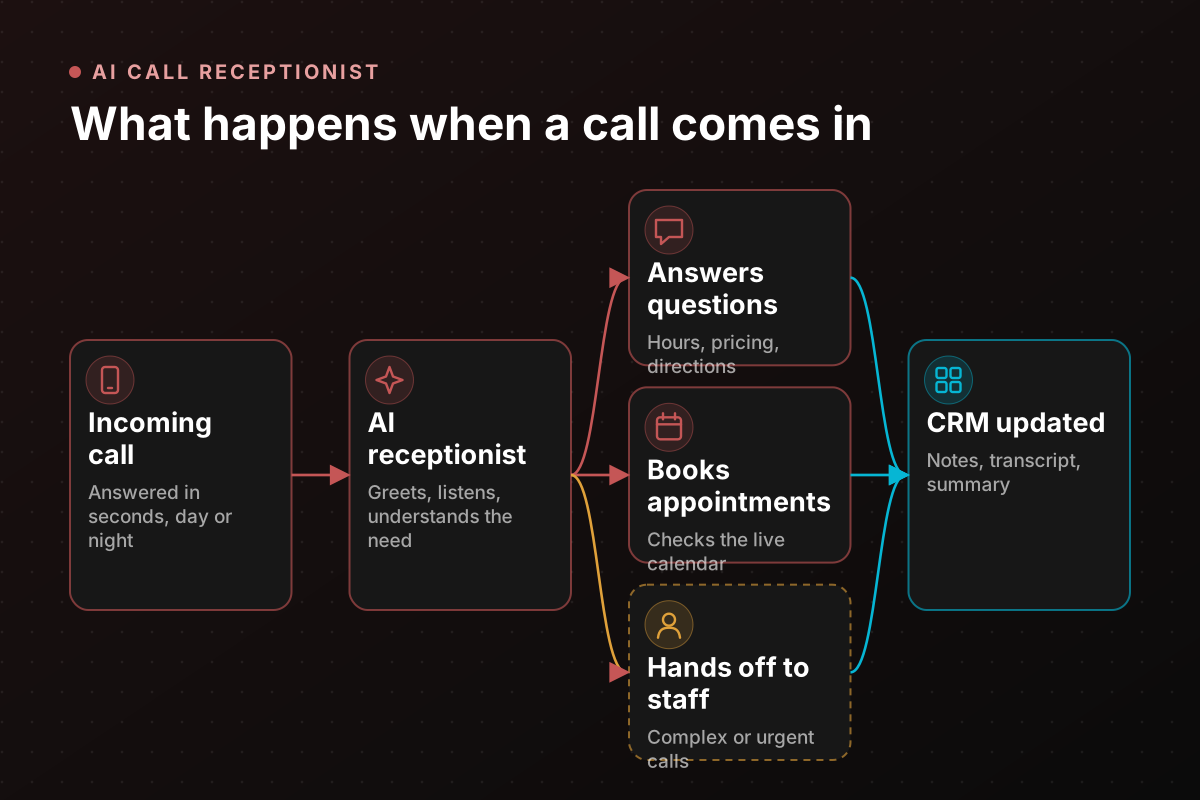
A strong call flow starts with a clear greeting. The caller should know they reached the right business and understand what the assistant can help with.
The receptionist then identifies intent. A new lead, existing customer, vendor, emergency, billing question, and reschedule request should not all follow the same path. Each path needs its own required information and handoff rule.
After the call, the system should save a clean summary. The team should not have to listen to every recording to know what happened. A useful record includes the caller's reason, captured details, recommended next step, and any promised follow-up.
Where voice receptionists add value
AI receptionists add value anywhere call volume is high enough that manual response creates delays but the call types are structured enough to define.
Common examples include dental clinics, med spas, home services, real estate teams, recruitment agencies, property managers, repair companies, training providers, and B2B service firms.
The best first use case is usually not the hardest call. It is the call that happens often, follows a known path, and creates measurable value when handled quickly.
AI receptionist vs IVR vs voicemail
Traditional IVR systems ask callers to press numbers. Voicemail asks callers to wait. An AI receptionist can have a natural conversation, capture structured information, and keep the call moving.
That does not mean every IVR should be replaced. For very simple routing, press-one menus are still predictable and cheap. Voice AI becomes more useful when callers need to explain something in their own words.
The main advantage is flexibility. Instead of forcing the caller into a menu, the assistant can ask, listen, clarify, and route.
Call design principles
Short prompts beat long speeches. Callers should not wait through a paragraph before they can speak.
The assistant should confirm important details, especially phone numbers, names, dates, and appointment times. It should avoid pretending to know things it cannot verify.
The tone should match the business. A medical clinic needs calm and careful language. A real estate intake line can be more energetic. A support line should be direct and efficient.
CRM and calendar integrations
Voice automation becomes much more useful when it connects to the systems the team already uses. A call summary in the wrong place creates another manual task.
Typical integrations include HubSpot, GoHighLevel, Salesforce, Airtable, Google Calendar, Calendly, Outlook, Slack, WhatsApp, SMS providers, and help desk tools.
For booking, the assistant should follow real availability rules. For CRM updates, it should avoid duplicate contacts, attach the call to the right record, and clearly mark AI-generated notes.

Lead qualification
Lead qualification is one of the best first call flows. The receptionist can collect the details a sales or operations team needs before calling back.
Useful fields include name, phone number, email, service requested, urgency, location, preferred time, budget range, company size, and the problem the caller wants solved.
The assistant should not over-interview the caller. Ask only what the team will actually use. Every extra question increases the chance the caller drops off.
Handoff rules
Human handoff should be designed from the start. A caller should reach a person when the request is urgent, emotional, high-value, legally sensitive, medically sensitive, or outside the assistant's scope.
The assistant should explain the handoff clearly. It can say that it is connecting the caller to the team, taking a message for a fast callback, or sending the details to a named department.
Good handoff includes context. The human should receive the summary, transcript, caller details, and reason for escalation so the caller does not have to repeat everything.
Privacy and consent
Calls may include personal information, payment details, health details, or confidential business context. That makes privacy design essential.
Decide whether calls are recorded, how long recordings are stored, who can access transcripts, and which data should be redacted. If local law or business policy requires consent, the call flow should include it.
Never store secrets in prompts or client-side code. Integration keys belong in secure environment variables, and access should be limited to the systems the receptionist actually needs.
Measuring call quality
Call quality is not only about whether the AI understood words. It is about whether the caller reached a useful outcome.
Track answered calls, missed-call reduction, booking rate, qualified leads, handoff rate, caller drop-off, average call duration, summary accuracy, and human corrections.
Review a sample of calls every week during rollout. Look for repeated confusion, awkward phrasing, missing data, and moments where the assistant should have escalated sooner.
Common use cases
| Use case | What the receptionist captures | Next step |
|---|---|---|
| Appointment booking | Service, preferred time, contact details | Calendar booking and confirmation SMS |
| New sales inquiry | Problem, budget, timeline, company details | CRM lead and sales task |
| Existing customer support | Account info, issue type, urgency | Ticket creation or transfer |
| After-hours intake | Caller details and reason for call | Morning callback queue |
| Vendor calls | Company, purpose, callback details | Routed internal note |
Rollout roadmap
Start with one call type. For example, after-hours missed-call capture or appointment booking. Write the ideal call flow, test it with your team, and collect real examples before launch.
Run the first version with conservative guardrails. Let it capture details and route calls rather than making complex promises.
After two or three weeks of review, expand the system. Add more FAQs, more routing branches, better CRM matching, and automated follow-ups once the basic experience is stable.
Where AI receptionists fail
They fail when the business has not defined the process. If staff answer the same question five different ways, the AI will struggle to provide one reliable answer.
They fail when handoff is missing. A caller with a sensitive or unusual problem should not be trapped in automation.
They also fail when integrations are treated as an afterthought. If the receptionist cannot save clean notes, book real slots, or notify the right person, the team still has manual work after every call.
Cost and ownership
Costs usually include voice minutes, model usage, phone numbers, integrations, hosting, and ongoing improvement. A cheaper tool can become expensive if it creates messy calls that staff must clean up.
Ownership matters too. Someone should review call summaries, update FAQs, maintain routing rules, and check failed handoffs. The receptionist is a living workflow, not a one-time script.
The right question is not "How cheap is each call?" It is "How many missed opportunities, delays, and manual follow-ups does this remove?"
Conclusion
AI call receptionists can improve response time, capture cleaner information, and reduce routine call pressure. They work best when the call flow is narrow, the handoff path is clear, and the system writes useful records into the tools the team already uses.
Start small, measure carefully, and expand only after callers and staff both trust the experience.
Frequently asked questions
Will callers know it is AI?
That depends on the business and local requirements. In many cases, clear disclosure is the safer and more trustworthy choice.
Can an AI receptionist book appointments?
Yes, if it is connected to a calendar or booking system with clear availability rules.
Can it handle angry callers?
It can recognize frustration and escalate quickly, but complex emotional calls should usually go to a person.
What is the best first call flow?
After-hours intake, appointment booking, and new lead qualification are strong starting points because they are common and measurable.