
AI Agents: From Chatbots to Digital Teammates
How modern AI agents plan, use tools and complete useful business workflows with the right guardrails.
TL;DR - 6 takeaways - 15-second read
- AI agents are useful when a workflow needs reasoning, tools, and follow-through instead of one simple answer.
- The best first agent has a narrow goal, clear success criteria, and limited access to systems.
- Tools, memory, approvals, and logs matter more than giving the agent a clever prompt.
- Human review should stay in the loop for irreversible, expensive, or sensitive actions.
- Most agent failures come from vague scope, weak tool design, or missing observability.
- A practical rollout starts with draft mode, then supervised execution, then careful autonomy.
Introduction
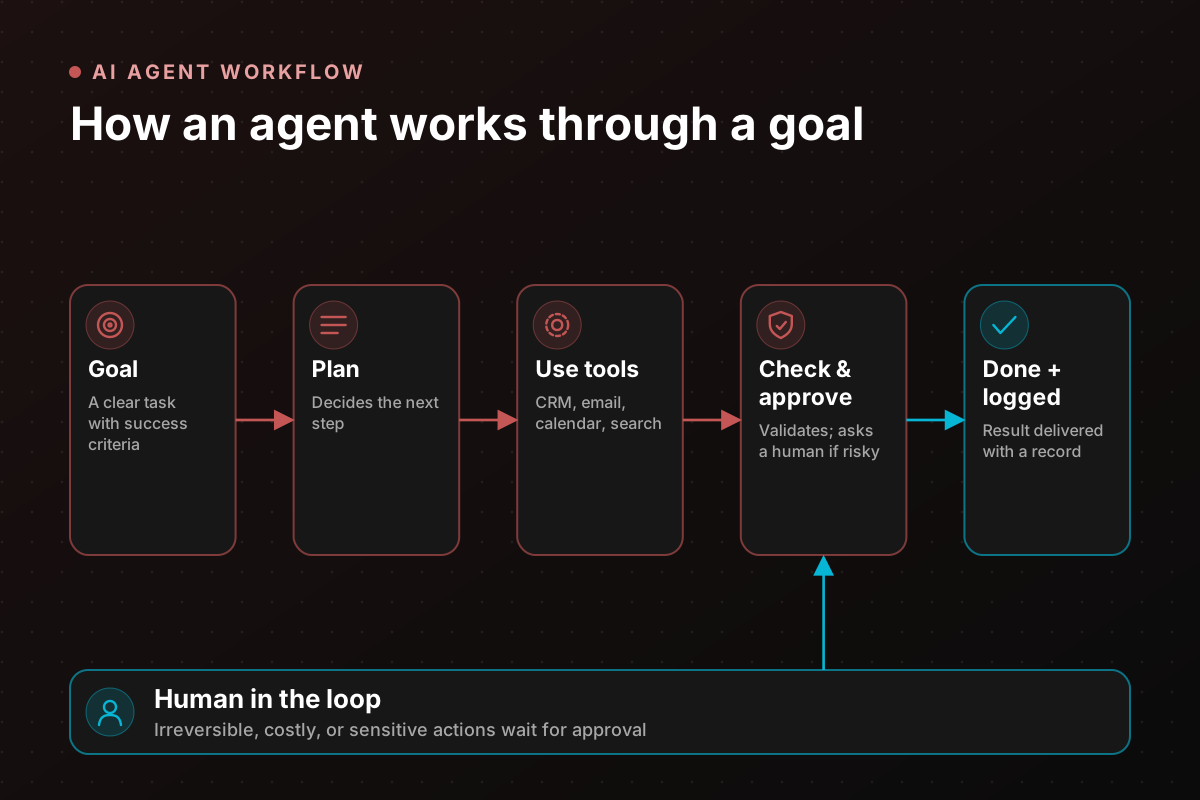
AI agents are moving automation beyond simple chat. A chatbot answers a question. An agent can understand a goal, decide the next step, use tools, check the result, and continue until the workflow is complete or a human needs to step in.
That difference sounds small until you apply it to real work. A lead qualification assistant can read a form submission, enrich the company, check CRM history, write a suggested reply, and assign a follow-up task. A support agent can summarize a ticket, search the knowledge base, draft a response, and update the case record after approval.
The opportunity is not to replace every person in the process. The opportunity is to remove the repeated coordination work that slows teams down.
What is an AI agent?
An AI agent is a software worker powered by a language model and connected to tools. It receives a goal, gathers context, decides what to do next, calls the tools it is allowed to use, and produces an output.
The tools can be simple, such as searching a knowledge base or reading a spreadsheet. They can also be business actions, such as creating a HubSpot note, scheduling a meeting, updating a ticket, sending a Slack message, or preparing an invoice draft.
The agent becomes valuable when it can operate across steps. It does not just answer "What should I do?" It helps do the work.
Agent capabilities at a glance
| Capability | What it means in practice |
|---|---|
| Goal understanding | Turns a request into a clear task or checklist |
| Planning | Decides the order of steps before using tools |
| Tool use | Calls APIs, databases, CRMs, calendars, email, and internal systems |
| Memory | Keeps useful context during a workflow and across repeated interactions |
| Validation | Checks outputs against rules, source data, or expected formats |
| Escalation | Routes risky or unclear cases to a person |
| Logging | Records what happened and why |
| Guardrails | Limits access, actions, and language based on business rules |
Agent vs chatbot vs automation
A chatbot is strongest when the job is conversation. It answers questions, explains information, and guides a user. A traditional automation is strongest when the process is predictable. It follows rules and moves data from one place to another.
An agent sits between those two. It can understand messy instructions like a chatbot, then take structured actions like automation. This makes agents useful for workflows where inputs vary but the desired outcome is consistent.
For example, "follow up with this lead" is too open for a basic automation. An agent can inspect the lead source, company size, budget signals, and previous messages, then draft a response that fits the context.
Where AI agents add value
Agents add the most value when a team already has a repeated process but the inputs are too variable for a rigid rule-based workflow.
Common examples include lead research, CRM cleanup, support triage, proposal drafting, meeting preparation, invoice review, recruiting shortlists, customer onboarding checks, and operational reporting.
The pattern is usually the same: a person reads information, decides what it means, updates a system, and writes a message. Agents are useful when that loop happens many times a week and the team can define what good work looks like.
Tool design
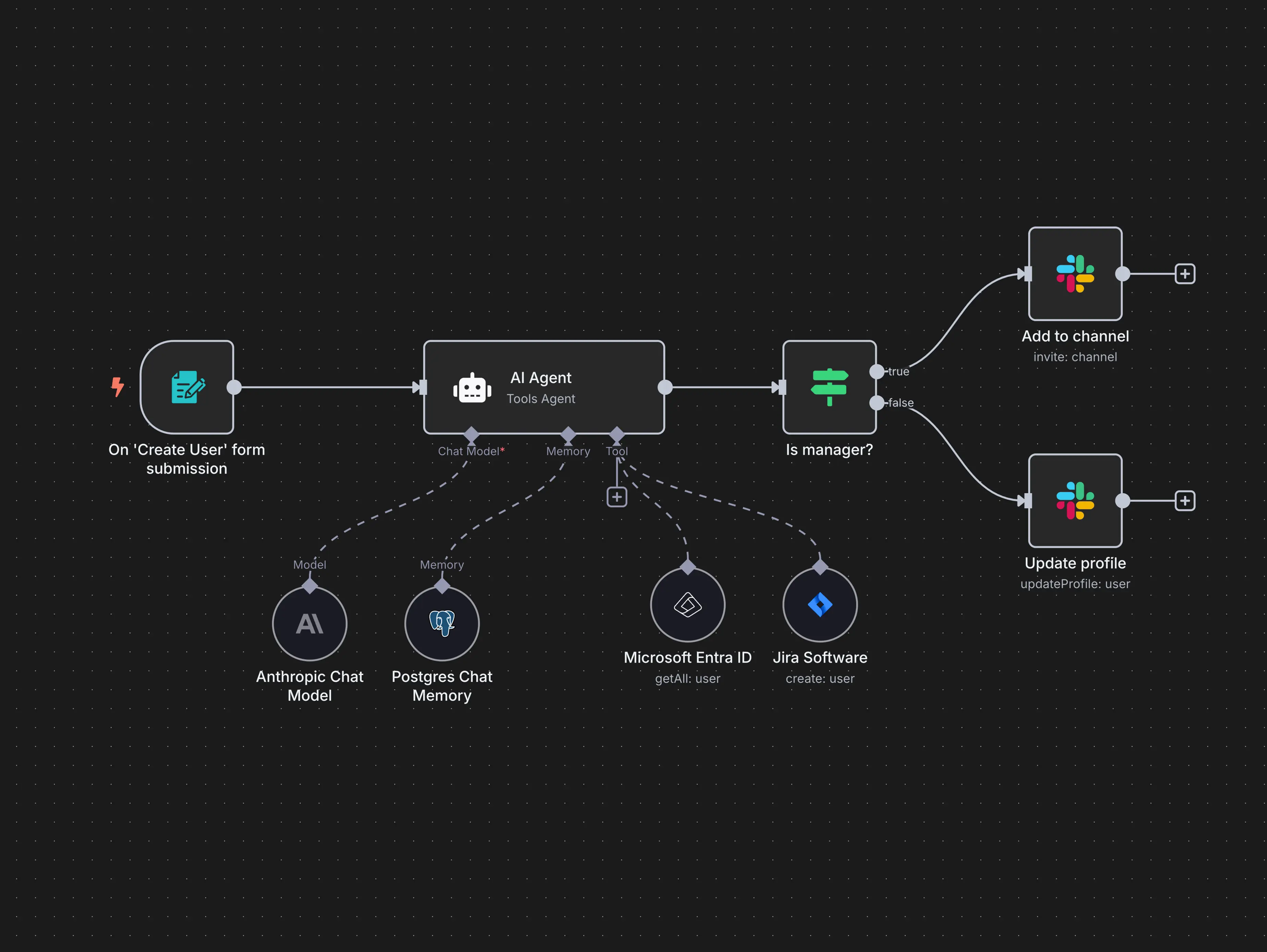
Tools are the hands of the agent. If the tools are unclear, unsafe, or too broad, the agent becomes unreliable.
A good tool does one job well. "Create CRM note" is safer than "use the CRM." "Search approved help articles" is clearer than "browse all documents." Each tool should have required inputs, validation rules, and a predictable result.
Tool descriptions matter because the model uses them to decide when to call each tool. If two tools sound similar, the agent may choose the wrong one. If a tool can create side effects, it should require confirmation or run in draft mode first.
Memory and context
Agent memory should be intentional. Some context is needed only during one task, such as the email being drafted. Other context may be useful over time, such as the customer's plan, preferred language, or account owner.
Do not store everything forever. Long memory can become noisy, stale, or risky. Useful memory is structured, reviewed, and tied to a purpose.
For business systems, the best memory often already lives in source tools: CRM records, project management tasks, billing systems, knowledge bases, and internal databases. The agent should read from those places instead of inventing a separate truth.
Guardrails and approvals
Guardrails decide what the agent can and cannot do. They should cover data access, tool permissions, tone, business rules, and escalation.
Approvals are especially important for actions that are expensive, irreversible, public, or sensitive. Sending a customer email, issuing a refund, deleting a record, changing a contract, or making a hiring decision should not happen silently.
The goal is not to slow the agent down. The goal is to place human judgment exactly where it matters.
Workflow examples
| Workflow | Agent role | Human role |
|---|---|---|
| Inbound lead review | Enriches company, checks CRM, scores fit, drafts reply | Approves the reply and sales priority |
| Support triage | Reads ticket, searches docs, suggests category and response | Handles edge cases and emotional conversations |
| Meeting prep | Summarizes account history and open tasks | Uses context in the call |
| Invoice check | Extracts fields, compares against purchase order, flags mismatch | Reviews exceptions |
| Weekly reporting | Pulls metrics, explains changes, drafts summary | Confirms interpretation |
Observability
Observability means the team can see what the agent did. Without logs, failures become mysterious and trust drops quickly.
A useful log includes the original request, tool calls, source records used, confidence signals, final output, and any human approval. This gives teams a way to debug errors, prove compliance, and improve prompts or tools.
Dashboards can track completion rate, escalation rate, time saved, rejected drafts, tool failures, and common reasons for human intervention.
Security and access
Agents should run with least privilege. They only need access to the systems required for the workflow. A support drafting agent should not have billing admin rights. A reporting agent should not be able to edit CRM records unless that is part of the approved design.
Secrets and API keys should live in server-side environment variables, not in prompts or front-end code. Logs should avoid storing unnecessary private data.
If an agent serves multiple customers or departments, access boundaries must be enforced before the model sees the data.
Cost and speed
Agent workflows can become expensive when they call large models too often, search too broadly, or retry without limits.
Cost control starts with scope. Use small models for formatting, classification, and extraction when possible. Reserve stronger models for reasoning-heavy steps. Cache repeated lookups. Limit tool calls. Stop the agent when it reaches a clear completion state.
Speed matters because the agent has to fit into the team's rhythm. If a sales rep waits two minutes for a lead summary, they may stop using it. Design the workflow around the moments where speed changes behavior.
Common failure patterns
The first failure is asking the agent to "handle everything." Broad goals create unpredictable behavior. Narrow goals create useful systems.
The second failure is weak tools. If the tool returns messy data or has unclear inputs, the agent spends its reasoning budget recovering from bad plumbing.
The third failure is no review process. Teams launch an agent, see a few good demos, then miss the edge cases that appear in real work. A staged rollout prevents that.
Implementation roadmap
Start in read-only mode. Let the agent gather information and draft recommendations without changing systems. This proves whether the context and reasoning are useful.
Move next to supervised execution. The agent prepares actions, and a human clicks approve. This builds confidence and reveals which actions can safely be automated later.
Only then give the agent limited autonomy. Pick low-risk actions with clear rollback paths, such as tagging records, creating draft tasks, or updating non-sensitive fields.
Metrics worth tracking
Track business outcomes, not just model behavior. Time saved, response time, data completeness, lead follow-up rate, ticket resolution speed, and fewer manual updates are easier to defend than "agent accuracy" alone.
Also track safety metrics. How often did the agent ask for help? How often did users reject drafts? Which tools failed? Which prompts caused confusion?
These numbers turn agent development from guessing into an improvement loop.
Who should not use agents?
Agents are not a good fit for unclear processes. If the team cannot explain how a task should be done, the agent will not magically discover the right standard.
Agents are also risky for high-stakes decisions without review. Medical, legal, financial, employment, and contractual actions need careful governance and human responsibility.
For simple, stable workflows, regular automation may be better. If the task is "when form arrives, add row to sheet," an agent is unnecessary.
Conclusion
AI agents are best understood as workflow helpers, not magic employees. They become useful when they have a narrow goal, strong tools, clean context, visible logs, and sensible approval points.
The teams that win with agents will not be the ones that give them the most freedom on day one. They will be the ones that design the work carefully, measure the results, and expand autonomy only after trust is earned.
Frequently asked questions
Can an AI agent work without human approval?
Yes, but only for low-risk tasks with clear boundaries. Most business agents should begin with human review.
Do agents replace automation platforms?
No. Agents often sit on top of automation platforms and use them as tools.
What is the best first agent?
Choose a narrow workflow with repeated volume, clear inputs, and a measurable output. Lead enrichment, support triage, and meeting prep are common starting points.
Why do AI agents fail?
Most fail because the scope is too broad, the tools are weak, or there is no way to inspect what the agent did.